
Hierarchies for Jira
Manage your Jira issues in a tree using standard relations and fields, with aggregated status summaries at every level
Get it on Atlassian MarketplaceFeatures
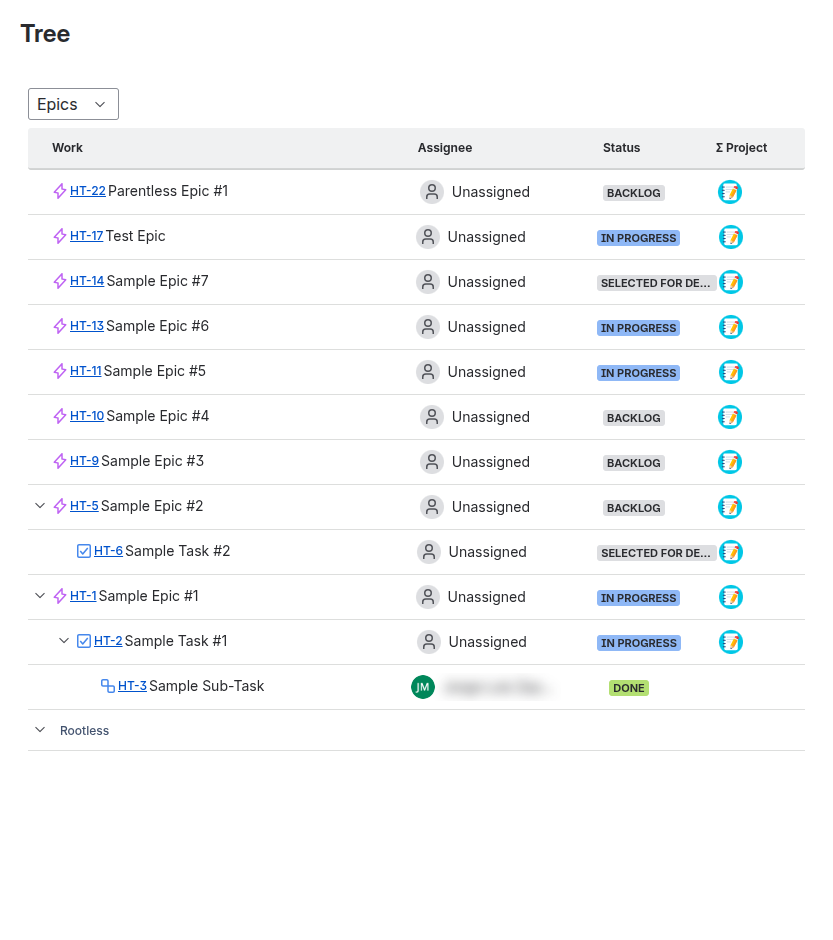
- Tree view of all project issues with unlimited hierarchy levels
- Summarize status of children issues at any level
- Create new child issues directly from the hierarchy view
- Expand and collapse at any hierarchy level
- Multiple hierarchy configurations per project
- Custom aggregation fields with Jira expressions
- Uses standard Jira relations and fields
Overview
Pixel Welding’s Hierarchies for Jira lets you visualize all your project’s issues in a single tree. See parent-child relationships at a glance, track progress across your issue hierarchy, and create new issues directly from the tree — all using standard Jira issue links and fields.
Key concepts
- Hierarchy — A named configuration that defines how issues relate to each other through levels, link types, and issue types. You can have multiple hierarchies per project.
- Level — A tier in the hierarchy (e.g. Epic → Story → Sub-task). Each level defines which issue types belong to it and how it links to the level above.
- Aggregation — Computed values on parent issues that summarize data from their children (e.g. progress bars, team members, custom metrics).
Quick start
- Install the app from the Atlassian Marketplace
- Configure your hierarchy — define levels, link types, and issue types
- Open the Tree panel on any project page to start using the tree view
Documentation
- Installation — How to install and set up the app
- Configuration — Creating and managing hierarchy levels
- Using the Tree View — Navigating, expanding, and creating child issues
- Aggregated Fields — Built-in and custom field aggregation
- JQL Queries — Search issues by hierarchy position using Jira Query Language
- Administration — Sync your hierarchy data and troubleshoot issues
- Migration Guide — Moving from the Connect app to Forge
Support
Visit our customer service portal to report a bug or request a feature.